Choose the business
Pick a category that fits your service. A focused search is easier to review than a broad list of unrelated businesses.
LEADFINDER / THE MOBILE APP
Research local businesses from your phone. Choose a category, set a location, and review the contact details available for each business.
Get the mobile appAvailable for Android and iPhone. Check current plans and allowances in the app.
See the research workflow ↓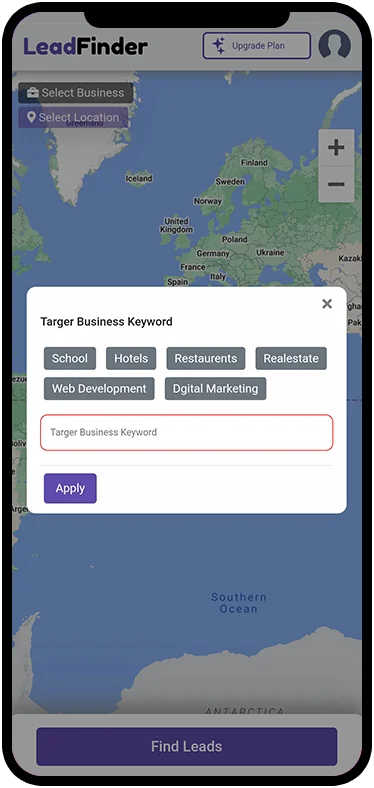
Existing product screenshots. Your app version may look different.
A PRACTICAL FIRST SEARCH
Pick a category that fits your service. A focused search is easier to review than a broad list of unrelated businesses.
Set a location and radius that you can realistically serve. Review the results before expanding into another area.
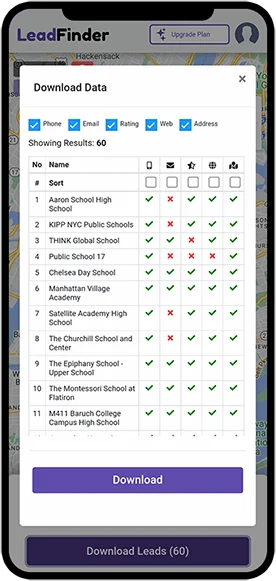
Review business websites and available contact fields. Add your own notes before deciding whether a prospect is a fit.
FROM DISCOVERY TO FOLLOW-UP
Export your results to CSV, check missing fields and duplicates, and prepare the records for your own workflow. A business listing is a research starting point; it does not establish buying intent or permission to contact someone.
Prepare an export for your CRM →YOUR RESEARCH CHECKLIST
ANDROID & IPHONE
Open the store listing for your device, check compatibility, and install LeadFinder. Review the current price, billing period and included allowances before subscribing.
Plan availability and features may vary by app version and platform.
BEFORE YOU START
Local businesses by category and location, together with contact details available in the results. Review each business before adding it to your outreach list.
No. Available fields vary by business. Check the business website and verify details before using them.
Check the plan screen in your app for current prices, billing periods and allowances. Review these details before confirming a purchase.
You can prepare a CSV export for a CRM that supports CSV imports. Check its required fields, map the columns and review duplicates first. An export does not automatically synchronize with your CRM.
Use LeadFinder support. Include the platform and a description of the issue; do not send your password or full card details.